
Odoo
Preparing your business for an Odoo implementation
What to review internally before starting an ERP rollout.
Read article

Odoo implementation helps growing businesses bring sales, accounting, inventory and other business processes into one connected system. Learn how to choose the right Odoo modules, plan implementation costs and timelines, manage customization and data migration and avoid common implementation challenges.
By Neha Singh · October 14, 2026
If your business has reached the point where sales live in one system, accounting in another, inventory in spreadsheets and customer information across email and CRM tools, the problem is no longer simply “which software should we buy?”
The bigger question is:
How do we bring the business together without creating another complicated system that people struggle to use?
That is where Odoo implementation matters.
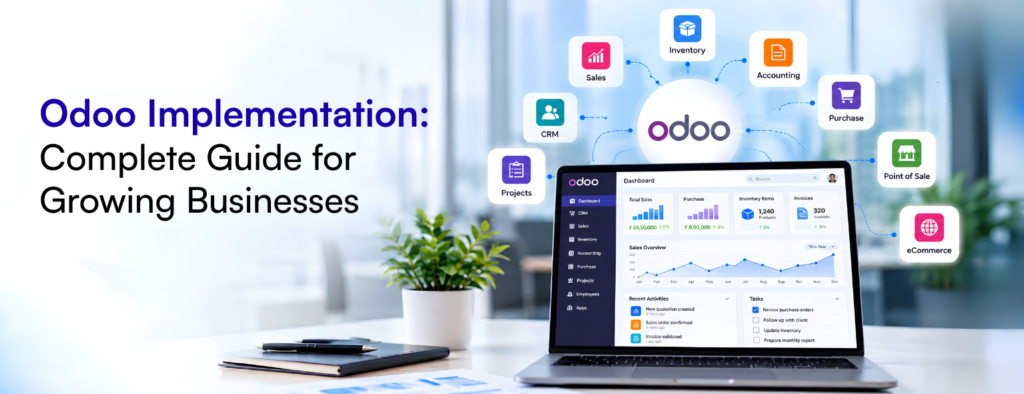
Odoo is a suite of integrated business applications covering areas such as CRM, sales, accounting, inventory, point of sale, eCommerce, projects and more. Its value comes from connecting these functions rather than making every department operate independently.
But buying Odoo is not the same as successfully implementing Odoo.
A good implementation starts with how your business operates today, identifies what should change, determines which Odoo capabilities can support those processes and then builds a controlled path to go live.
This guide explains how Odoo implementation works, how to choose the right modules, what affects cost and timeline, when customization makes sense and how to avoid common implementation problems.
Quick Answer
Odoo implementation is the process of configuring Odoo around a company’s business processes, migrating required data, integrating external systems, customizing genuine business requirements, testing workflows, training users and deploying the system. A successful implementation focuses on how the business operates rather than simply installing Odoo modules.
Odoo implementation is the process of adapting Odoo to a company’s business processes and putting the system into operational use. This can involve requirements analysis, process mapping, module selection, configuration, data migration, integrations, custom development, testing, training and deployment. The important distinction is that Odoo implementation is a business process project, not simply a software installation.
For example, implementing Odoo CRM is not just about creating a pipeline.
You need to decide how leads enter the system, who owns them, how opportunities move between stages, what information salespeople need to record, which activities should be automated and what happens when an opportunity becomes a customer.
The same principle applies to accounting, inventory, purchasing, POS and eCommerce.
A successful implementation starts with the business process and then determines how Odoo should support it.
The trigger is often fragmentation.
A growing company might have a setup like this:
Website → CRM → Spreadsheet → Accounting Software → Inventory System → Payment Gateway
Each application may perform its own job well. The problem is the gaps between them.
A sales employee might enter customer information in the CRM while finance maintains a separate record. Inventory may not immediately reflect online orders. Management reports may require manual consolidation.
Odoo can reduce this fragmentation by connecting related business processes.
For example:
Lead → Opportunity → Quotation → Sales Order → Delivery → Invoice → Payment
Instead of treating each stage as a separate activity, information can flow through a connected system.
This does not mean Odoo is automatically the right choice for every business. The decision should depend on the company’s processes, complexity, budget, technical requirements and willingness to change existing workflows.
Odoo is worth evaluating when your business has several connected processes that are becoming difficult to manage independently.
Typical warning signs include:
The key question is not whether Odoo has enough features.
It is whether Odoo can support your important business processes without introducing unnecessary complexity.
That is why requirements discovery should happen before implementation.
One of the easiest ways to make an ERP project unnecessarily complicated is to implement too many applications at once.
Instead of asking, “Which Odoo modules should we buy?” start by asking, “Which business problems are we trying to solve?”
For example:
| Business Requirement | Potential Odoo Application |
| Lead and opportunity management | CRM |
| Quotations and sales orders | Sales |
| Customer invoices | Accounting / Invoicing |
| Supplier purchasing | Purchase |
| Stock management | Inventory |
| Retail transactions | Point of Sale |
| Online selling | eCommerce |
| Employee management | Employees / HR |
| Leave management | Time Off |
| Project delivery | Project |
| Employee time tracking | Timesheets |
| Manufacturing | Manufacturing |
| Customer support | Helpdesk |
| Marketing automation | Marketing Automation |
A growing distributor might initially need CRM, Sales, Purchase, Inventory and Accounting. An eCommerce business may need Sales, Inventory, Accounting and eCommerce. A restaurant or retail business may prioritize POS, Inventory, Purchase and Accounting.
We recently worked on an Odoo setup where CRM, POS and accounting were part of the same business workflow. The important part was not simply activating these applications. The implementation needed to consider how customer information, sales transactions and financial records should move through the business.
This is why module selection should start with the workflow rather than the size of the company or the number of features available in Odoo.
A useful approach is to identify the processes that are most important to the business and implement those first.
Additional applications can be introduced later when there is a clear business reason.
This can make adoption easier and reduce unnecessary implementation complexity.
A structured Odoo ERP implementation normally moves through several connected stages.
The first stage should focus on understanding how the business currently operates.
This means looking at sales, purchasing, finance, inventory, customer management and other relevant processes.
For each process, identify:
What happens today?
Who is responsible?
Which system is used?
Where are the manual steps?
Where do errors occur?
What should the future process look like?
For example, suppose a company requires manager approval for discounts above a certain percentage.
That requirement should be identified during discovery. Otherwise, the implementation team may configure a standard sales workflow and only discover the requirement during testing.
Good requirements analysis prevents this kind of rework.
Once the requirements are understood, the current processes can be mapped against Odoo.
The objective is to determine what can be handled through standard Odoo functionality, what requires configuration and where a genuine gap exists.
This is also the stage to decide:
A useful principle is:
Standard functionality first. Customization where justified.
Trying to reproduce every feature of an old system inside Odoo can create unnecessary complexity.
Configuration adapts standard Odoo functionality to the company’s requirements. Depending on the project, this can involve sales workflows, warehouses, products, taxes, pricelists, approval rules, user permissions, accounting settings, email templates and reporting. Configuration is generally preferable to custom development when standard Odoo can meet the requirement.
The goal is not to change Odoo as much as possible.
The goal is to configure it appropriately for the business.
Data migration is one of the most important parts of an Odoo implementation.
Businesses may need to migrate customers, vendors, products, inventory, sales orders, purchase records, accounting data and other information from their existing systems.
In our Odoo projects, migration requirements have included reviewing existing business data, mapping fields and preparing information for import into Odoo.
The migration process should not be treated as a simple export and import exercise. Existing data should be reviewed for duplicates, missing information, incorrect records and outdated information before it is moved into the new system.
The goal is not always to migrate every piece of historical data. Instead, businesses should determine which information is required for ongoing operations, reporting and compliance.
A proper migration process usually includes data cleaning, field mapping, test imports, validation and a final migration before go-live.
For larger implementations, a test migration is particularly important because it can identify data mapping issues before they affect the production environment.
Odoo may need to exchange information with external platforms such as WooCommerce, Shopify, payment gateways, shipping platforms or custom applications.
For example, in an Odoo project involving WooCommerce, the integration needed to be considered as a business workflow rather than simply a technical connection. Customer information, products, orders, inventory and financial information can all have different synchronization requirements.
Before building an integration, it is important to establish which system is responsible for each type of data, when information should synchronize and what should happen when synchronization fails. A connection can be technically successful while still creating operational problems if these rules have not been defined.
For an eCommerce integration, for example, the implementation team may need to determine how customers, products, orders, inventory and payments move between Odoo and the online store. Defining the source of truth for each type of data also helps prevent conflicting customer, product or inventory information across systems.
This is why integration planning should happen during the Odoo implementation process rather than being treated as a separate technical task after the core system has been configured.
Odoo 19 provides the JSON-2 API for external integrations. Odoo’s current documentation also describes changes to its external API architecture, so new integrations should be designed against the API capabilities and documentation applicable to the Odoo version being implemented.
Sometimes standard Odoo cannot meet a genuine business requirement. That does not automatically mean custom development is the answer.
We’ve encountered this distinction in Odoo customization work involving business documents and QWeb reports. Requirements can range from changing the layout of an invoice or purchase order to introducing a completely different document workflow. The right approach is to first determine whether the requirement can be handled through Odoo’s standard configuration before introducing custom code.
A requirement should first be evaluated against three possibilities:
Can standard Odoo handle it?
If yes, use the standard functionality.
Can configuration or automation solve it?
If yes, customization may not be necessary.
Is there a genuine business requirement that Odoo cannot reasonably support?
If yes, custom development may be justified.
This distinction matters because custom code becomes part of the company’s long-term ERP environment.
It may need maintenance, testing and attention during future Odoo upgrades.
A good implementation partner should therefore be able to explain not only what they recommend customizing but also why.
Testing should cover complete business processes rather than isolated screens.
For example, a sales workflow might be tested from:
Lead → Opportunity → Quotation → Sales Order → Delivery → Invoice → Payment
A purchasing workflow could be:
RFQ → Purchase Order → Receipt → Vendor Bill → Payment
Testing should verify that the right information reaches each stage.
User Acceptance Testing is particularly important because business users may identify issues that developers do not see.
A salesperson may discover that a required field slows down quotation creation.
A warehouse employee may find that a transfer workflow does not reflect the actual warehouse process.
An accountant may identify a reporting or reconciliation issue.
These findings are much easier to address before go-live.
Training should focus on the user’s role rather than attempting to teach every Odoo feature.
A salesperson needs to know how to manage opportunities and quotations.
A warehouse employee needs to understand receipts, transfers and deliveries.
An accountant needs to understand the relevant financial workflows.
After training and final testing, the business can prepare for the production launch.
A proper go-live plan should cover the final data migration, user access, integrations, reports, opening balances, support and rollback considerations where appropriate.
There is no single Odoo implementation cost that applies to every business.
Odoo separates software subscription costs from implementation services, and the total project cost depends on the scope of the implementation.
The major factors are usually:
| Cost factor | Why it matters |
| Modules | More applications can increase configuration and testing |
| Users | More users can increase training and access-management requirements |
| Data migration | Large or poorly structured datasets require more preparation |
| Integrations | Each integration requires development, mapping and testing |
| Customization | Custom development adds implementation and maintenance effort |
| Business complexity | Multiple companies, locations or complex workflows increase scope |
This is why a low initial implementation quote can sometimes become much more expensive when requirements are discovered later.
Before comparing Odoo implementation providers, make sure you are comparing the same scope.
Ask whether the proposal includes:
Discovery + configuration + migration + integrations + customization + testing + training + go-live support
rather than comparing only an hourly rate.
The Odoo implementation timeline depends on the scope and complexity of the project.
A simple implementation using standard workflows and limited migration can be considerably different from an implementation involving multiple companies, warehouses, integrations, historical data and custom development.
Instead of promising a fixed number of days before understanding the requirements, a better approach is to divide the project into milestones:
Discovery → Design → Configuration → Migration → Development → Integration → Testing → UAT → Training → Go-live
This also makes it easier to identify delays.
For example, an integration that depends on an external vendor may affect the overall schedule even when the Odoo configuration itself is complete.
Most implementation problems are not caused by one missing Odoo feature.
They are usually caused by decisions made before or during implementation.
| Challenge | Why it causes problems |
| Poor requirements | Important requirements appear late |
| Excessive customization | Increases complexity and maintenance |
| Poor data quality | Transfers existing problems into Odoo |
| Weak integrations | Creates inconsistent information |
| Insufficient testing | Business-process errors reach production |
| Low adoption | Users continue using spreadsheets or old systems |
These problems can often be reduced through better discovery, phased implementation and active involvement from business users.
A few principles make a significant difference.
Start with business processes. Understand how the company works before configuring the software.
Keep the first phase focused. Implement the applications that solve the most important problems first.
Use standard Odoo where practical. Custom development should have a clear business justification.
Treat migration as a separate workstream. Clean, map and test data before the final migration.
Test real scenarios. Ask users to perform the tasks they will actually perform after go-live.
Involve key users early. They understand operational problems that may not appear in technical requirements.
Plan for the future. Customizations and integrations should be designed with future maintenance and upgrades in mind.
Although they are often discussed together, migration and implementation are different activities.
An Odoo implementation generally refers to introducing and configuring Odoo for business operations.
An Odoo migration generally refers to moving an existing Odoo environment, database or business data to another version or environment.
For example, moving from a legacy ERP to Odoo is primarily a new ERP implementation combined with data migration.
An upgrade from one Odoo version to another is different. Recent Odoo 18 to Odoo 19 work has shown why businesses with customized environments should not treat a major version upgrade as a simple version change. Existing reports, workflows and custom modules may need to be reviewed and tested before production.
This is particularly important for businesses that rely on customized QWeb reports or other Odoo extensions. A report that worked correctly in the previous version should be validated again after the upgrade rather than assumed to be unchanged.
Odoo provides official upgrade documentation for its supported deployment environments.
If you are upgrading an existing Odoo system, do not treat it as a simple version-number change. Customizations and integrations should be reviewed before the upgrade.
There is no universal answer.
DIY implementation can make sense when the requirements are relatively straightforward, the business has internal technical resources and there are limited integrations or custom workflows.
An implementation partner becomes more valuable as complexity increases.
For example, consider a business with several warehouses, multiple legal entities, an eCommerce store, accounting requirements and several external integrations.
The challenge is not simply configuring Odoo.
It is making sure all of these processes work together correctly.
An experienced Odoo implementation partner can help with requirements discovery, solution design, migration, integration, customization, testing and deployment.
Odoo itself provides different implementation assistance options depending on project requirements, including Success Packs and partner-led services.
Do not evaluate an implementation partner only on price.
Ask how they approach the project.
Look for a structured discovery and requirements process.
The partner should be able to explain why customization is necessary.
Ask about data cleaning, mapping, test migration and validation.
The answer should include realistic end-to-end workflows and UAT.
Clarify support, maintenance and issue resolution.
This becomes particularly important when custom modules or integrations are involved.
A good partner should be able to explain the reasoning behind its recommendations rather than simply proposing more development.
Before going live, make sure the project has addressed the following:
| Area | Questions to confirm |
| Requirements | Are the important business processes documented? |
| Modules | Are the selected applications actually required? |
| Data | Has the migration data been cleaned and validated? |
| Integrations | Have external systems been mapped and tested? |
| Customization | Does each custom feature have a clear business reason? |
| Security | Are user roles and access rights configured correctly? |
| Testing | Have complete workflows been tested? |
| UAT | Have actual business users signed off? |
| Training | Do users understand their daily workflows? |
| Go-live | Is there a documented cutover and support plan? |
A successful implementation is not simply one where Odoo is live. It is one where the business can actually operate effectively through the system. Sales can manage opportunities and orders, operations can track work and inventory, finance can access accurate transaction information and management can rely on useful reporting. Employees understand their workflows and integrations work as expected.
The ultimate measure is therefore not:
“Did we install Odoo?”
It is:
“Did Odoo improve the way our business operates?”
Professional assistance is worth considering when your implementation involves significant data migration, multiple departments, complex accounting, multiple warehouses, eCommerce, third-party integrations, custom workflows or multiple companies.
For a straightforward setup, a business with strong internal resources may be able to handle more of the work itself.
The more expensive the consequences of an implementation mistake become, the more valuable structured planning, testing and specialist support can be.
Before you start configuration or development, make sure you have a clear implementation plan.
Accelaronix can review your current workflows, required Odoo modules, integrations, migration requirements and customization needs and help you build a practical implementation roadmap.
Talk to Accelaronix about your Odoo implementation →
Whether you are implementing Odoo for the first time, migrating from another ERP or upgrading an existing Odoo environment, starting with a clear understanding of your requirements can reduce unnecessary development and implementation risk.
Keep reading
Odoo
What to review internally before starting an ERP rollout.
Read article